Total Pageviews

Tuesday, 17 July 2012

Personal computer hardware


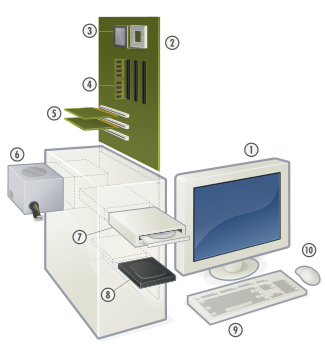
Personal computer hardware are the component devices that are the building blocks of personal computers. These are typically installed into acomputer case, or attached to it by a cable or through a port. In the latter case, they are also referred to as peripherals.
[edit]Computer Case

A computer case (also known as a computer chassis, cabinet, box, tower, enclosure, housing, system unit or simply case) is the enclosure that contains most of the components of a computer (usually excluding the display, keyboard and mouse). A computer case is sometimes incorrectly referred to metonymously as a CPU referring to a component housed within the case. CPU was a common term in the earlier days of home computers, when peripherals other than the motherboard were usually housed in their own separate cases.

[edit]Power supply

Inside a custom-built computer: the power supply at the bottom has its own cooling fan.
A power supply unit (PSU) converts alternating current (AC) electric power to low-voltage DC power for the internal components of the computer. Some power supplies have a switch to change between 230 V and 115 V. Other models have automatic sensors that switch input voltage automatically, or are able to accept any voltage between those limits. Power supply units used in computers are nearly always switch mode power supplies (SMPS). The SMPS provides regulated direct current power at the several voltages required by the motherboard and accessories such as disk drives and cooling fans.

[edit]               Motherboard

The motherboard is the main component inside the case. It is a large rectangular board with integrated circuitry that connects the other parts of the computer including the CPU, theRAM, the disk drives (CD, DVD, hard disk, or any others) as well as any peripherals connected via the ports or the expansion slots.
Components directly attached to the motherboard include:
  • The CPU (Central Processing Unit) performs most of the calculations which enable a computer to function, and is sometimes referred to as the "brain" of the computer. It is usually cooled by a heat sink and fan. Most newer CPUs include an on-die Graphics Processing Unit (GPU).
  • The Chipset, which includes the north bridge, mediates communication between the CPU and the other components of the system, including main memory.
  • The Random-Access Memory (RAM) stores the code and data that are being actively accessed by the CPU.
  • The Read-Only Memory (ROM) stores the BIOS that runs when the computer is powered on or otherwise begins execution, a process known as Bootstrapping, or "booting" or "booting up". The BIOS (Basic Input Output System) includes boot firmware and power management firmware. Newer motherboards use Unified Extensible Firmware Interface (UEFI) instead of BIOS.
  • Buses connect the CPU to various internal components and to expansion cards for graphics and sound.
    • Current
      • PCI Express: for expansion cards such as graphics, sound, network interfaces, TV tuners, etc.
      • PCI: for other expansion cards.
      • SATA: for disk drives.
    • Obsolete
      • AGP: superseded by PCI Express.
      • ATA
      • VLB: VESA Local Bus, superseded by AGP.
      • EISA
      • Micro Channel architecture
      • ISA: expansion card slot format obsolete in PCs, but still used in industrial computers.
  • Ports for external peripherals. These ports may be controlled directly by the south bridge I/O controller or provided by expansion cards attached to the motherboard.
    • USB
    • Memory Card
    • FireWire
    • eSATA
    • SCSI

[edit]Expansion Cards

The expansion card (also expansion board, adapter card or accessory card) in computing is a printed circuit board that can be inserted into an expansion slot of a computer motherboard or backplane to add functionality to a computer system via the expansion bus.
An example of an expansion card is a sound card that enables the computer to output sound to audio devices, as well as accept input from a microphone. Most modern computers have hardware support for sound integrated in the motherboard chipset but some users prefer to install a separate sound card as an upgrade. Most sound cards, either built-in or added, have surround sound capabilities and 3-D sound effects.

[edit]Secondary Storage Devices

Computer data storage, often called storage or memory, refers to computer components and recording media that retain digital data. Data storage is a core function and fundamental component of computers.

[edit]Fixed Media Devices

  • Hard disk drives: a hard disk drive (HDD; also hard drive, hard disk, or disk drive)[2] is a device for storing and retrieving digital information, primarily computer data. It consists of one or more rigid (hence "hard") rapidly rotating discs (often referred to as platters), coated with magnetic material and with magnetic heads arranged to write data to the surfaces and read it from them.
  • Solid-state drives: a solid-state drive (SSD), sometimes called a solid-state disk or electronic disk, is a data storage device that uses solid-state memory to store persistent data with the intention of providing access in the same manner of a traditional block I/O hard disk drive. SSDs are distinguished from traditional magnetic disks such as hard disk drives (HDDs) or floppy disk, which are electromechanical devices containing spinning disks and movable read/write heads.
  • RAID array controller - a device to manage several internal or external hard disks and optionally some peripherals in order to achieve performance or reliability improvement in what is called a RAID array.

[edit]Removable Media Devices

  • Optical Disc Drives for reading from and writing to various kinds of optical media, including Compact Discs such as CD-ROMs,DVDs, DVD-RAMs and Blu-ray Discs. Optical discs are the most common way of transferring digital video, and are popular for data storage as well.
  • Floppy disk drives for reading and writing to floppy disks, an outdated storage media consisting of a thin disk of a flexible magnetic storage medium. These were once standard on most computers but are no longer in common use. Floppies are used today mainly for loading device drivers not included with an operating system release (for example, RAID drivers).
  • Zip drives, an outdated medium-capacity removable disk storage system, for reading from and writing to Zip disks, was first introduced by Iomega in 1994.
  • USB flash drive plug into a USB port and do not require a separate drive. USB flash drive is a typically small, lightweight, removable, and rewritable flash memory data storage device integrated with a USB interface. Capacities vary, from hundreds of megabytes (in the same range as CDs) to tens of gigabytes (surpassing Blu-ray discs but also costing significantly more).
  • Memory card readers for reading from and writing to Memory cards, a flash memory data storage device used to store digital information. Memory cards are typically used on mobile devices. They are thinner, smaller and lighter than USB flash drives. Common types of memory cards are SD and MS.
  • Tape drives read and write data on a magnetic tape, and are used for long term storage and backups.

[edit]Input and output peripherals

Input and output devices are typically housed externally to the main computer chassis. The following are either standard or very common to many computer systems.
Wheel mouse

[edit]Input

  • Text input devices
    • Keyboard - a device to input text and characters by depressing buttons (referred to as keys or buttons).
  • Pointing devices
    • Mouse - a pointing device that detects two dimensional motion relative to its supporting surface.
      • Optical Mouse - uses light (laser technology) to determine mouse motion.
    • Trackball - a pointing device consisting of an exposed protruding ball housed in a socket that detects rotation about two axes.
    • Touchscreen - senses the user pressing directly on the monitor.
  • Gaming devices
    • Joystick - a hand-operated pivoted stick whose position is transmitted to the computer.
    • Game pad - a hand held game controller that relies on the digits (especially thumbs) to provide input.
    • Game controller - a specific type of controller specialized for certain gaming purposes.
  • Image, Video input devices
    • Image scanner - a device that provides input by analyzing images, printed text, handwriting, or an object.
    • Web cam - a video camera used to provide visual input that can be easily transferred over the internet.
  • Audio input devices
    • Microphone - an acoustic sensor that provides input by converting sound into electrical signals.

[edit]Output

  • Printer - a device that produces a permanent human-readable text or graphic document.
    • Laser printer
    • Inkjet printer
    • Dot matrix printer
    • Thermal printer
  • Computer monitors
  • Speakers

Friday, 13 July 2012

INFORMATION ABOUT HARDWARE


 Physical Damages of Hard disk

When clicking sound starts coming from hard disk drive, this indicates that hard drive is facing some problem. This only happens when power fluctuate while you are working on the computer. This shows that your hard disk is physically damaged.


 Computers: External Hard Drive Recovery

You can store your computer data in several different ways. Data can be stored on removable disks, hard drives, CDs, DVDs, and other types of media.


 Become your hard drive doctor??

Hard drives are the main data storage areas of a computer. There are a lot of delicate electrical and magnetic instruments in a hard drive. For the purpose of maintaining these hard drives, it is important to understand their working. The hard drives contain a read/write head and a spindle motor. This head receives electrical impulses from the CPU and writes the information onto hard disk clusters through a magnetic field. Any kind of tampering with this equipment or with the computer in ...


 How to build a Computer

Building a computer is not like trying to break the bank at an online casino or a casino in Las Vegas, it is very simple, once you know how.


 How To Repair LG 710E CRT Monitor With Power Blink Symptom

The LG 710E 17” CRT Monitor came in with the complaint of power blink. A power blink problem can be cause by either in primary or secondary section or even in both sections.


 Batteries and the HP NC6000 Notebook

The HP nc6000 notebook has the capacity for two batteries -- a 'primary' battery and a 'Multiday' battery (that slides into the same slot used for a DVD/CD drive.) When on battery power the notebook utilizes the primary battery first until it drains out, then it is supposed to switch over to the Multiday battery. When the primary battery drained down to zero, all power cut off to the notebook and it immediately shut down.


 The Different Memory Cards And The Speed Of Some Of Them

The MMC and Secure digital cards are not the same but are interchangeable. The difference has to do with copy protections of the disk volume on the SD card. This extra feature makes the SD attractive for people who use them in MP3 players. No other cards are interchangeable. The Canon Power shot A510 you described comes with only 16MB, so it would be best to invest in more memory capacity. What I would recommend is getting one memory card that you will be able to use, even as your need for the ...


 DeFragging Your Hard Drive

A multi-tasker needs all the RAM his PC will handle. I just increased mine to 2GB and I can tell a big difference. On the other hand, 512MB is a pretty healthy amount of real memory for a notebook - especially if you are using a PIV processor. If you have a Celeron, however, it needs a lot of help. I have resorted to the reformat, reinstall process a few times - but it was always with Celerons and the computers were slow from the second you turned them on.


 Web-Based SMTP Server Monitoring

Web-based monitoring of SMTP email servers is normally conducted using one of two different approaches. The first uses a socket level connection to verify whether or not the target server is operational. The second more comprehensive method involves sending round-robin messages to your email system and its subcomponents. Depending on your needs, hardware, and company size both have validity and a rightful place. To determine what is best for your company, let’s examine both in more detail ...


 How To Speed Up Your PC.

One of the most annoying things I have noticed with personal computers is the noticeable drop off in speed and performance as the system gets older. When I first buy the system or when I have freshly installed Windows the whole system seems to zip along, programs open faster the system starts up faster. A few months of hard use later and I get more and more frustrated, I am forced to wait for everything as my PC grinds along apparently making hard work of the smallest task.


 The History and Origins of Our PC Computer Keyboards

The keyboard is among the most underappreciated and taken for granted component of the Personal Computer (PC) that we use everyday.


 An Introduction To Raid – Greater Reliability ,faster, Less Costly Hard Drive Units

What is a raid setup on a computer system? Like anything else it depends who you talk to. Raid hard drive systems had their acronym explained as “Redundant Array of Individual Drives “and “Redundant Array of Inexpensive Drives”. The acronym for this is the shortened term “RAID”.


 The History Of Microcomputers

The history of microcomputers does not compare with the history of ancient Mesopotamia (Iraq). Microcomputers (now commonly held as PCs) have been around for only 25 – 30 years.


 Why Choose A Core 2 Duo For Your CPU In Your New High End Computer ?

It must have been difficult for Intel to watch AMD's Athlon 64 and then the Athlon 64 X2 and FX pretty much take over the performance PC market, putting the once-untouchable chip giant into a position where its only competitive response was to cut prices. Those were dark days indeed. But now, with the release of the long-awaited codename "Conroe" -- the Core 2 Duo and Core 2 Extreme processors -- Intel looks set to start a new age of desktop domination.


 How To Properly Install A New Video Card

Your video card is one of those components in your computer you want to both learn as much about it as possible and to learn how to remove the old one and install a new card quickly.Playing those awesome games will be that much more enjoyable with one of those muscle bound video cards boosting video performance to the max.


 Keeping Your Computer Happy

Does your computer last for only a year or so, hangs every so often, and gets struck by virus most of the time? Are you giving it enough hours of rest? Is it cool enough most of the times? Can its memory handle all the applications that you use?


 Selecting a New Motherboard: A Beginner's Guide

Are you looking for a new motherboard? With so many models available, deciding which to buy can be difficult. However, if you use this checklist, considering each motherboard feature, you should be able to find one that’s right for you.


 Graphic Cards: How To Choose The Best

Do you remember the old computing days when there were no sounds except for maybe a beep occasionally and printers making more noise than a cat on a scratching post or how about monitors that offered nothing more than a green or orange glow?


 What Is Random Access Memory

RAM is considered volatile storage because as soon as the power supply is stopped, the contents of RAM are lost. Hence, the data in RAM stays as long as the computer is running. RAM is much faster to read from and write to, when compared to other storage devices like hard disk, CDROM, Floppy disk etc. RAM can be both read and written; therefore, it is sometimes also called read-write memory. There are two fundamental types of RAM:(a) Dynamic RAM (DRAM)


 All About Dye-Sublimation Printers

Dedicated photo printers differ from all-purpose printers as they are designed to print photos only, as opposed to text or graphics documents in addition to photos. They are generally compact in size and lightweight, and some models even feature batteries that allow you to print without the need for an outlet. Most photo printers, including dye-sublimation (or dye-sub) printers, are built around a thermal dye engine, though there are a few that feature inkjet technology. For many ...


 What Is Optical Disk?

OPTICAL DISK Optical disk is an electronic data storage medium from which data is read and written to by using a low-powered laser beam. It is flat, circular, plastic or glass disk on which data is stored in the form of light and dark pits. The laser beam reads the pits and the data can be accessed. There are three basic types of optical disks: • Read-only optical disks: The optical disks, which are recorded at the time of manufacture and cannot be erased. CD, ...


 Computer Memory - Why It's Important

Many of you have probably asked yourselves this many times. For those of you who are looking to buy or have already purchased a computer may still be asking yourselves what this piece of hardware does for your computer. Buying computer memory is not as simple as going to the store and asking a sales representative for it. Each computer can only support a certain type of memory.


 Is Intel's Core 2 Duo Processor Worth the Hype?

In the months leading up to the release of Core 2 Duo processor - also referred to as "Conroe" for desktops - many questions remained unanswered. Did Intel make the necessary changes to compete with AMD's processor advantage?


 How To Correct A Slow Running Computer

You push the power button on your computer and 5 minutes later you're finally ready to start computing.It seems as though it takes forever and a day for your computer to get going,Why?


 What’s That Noise Coming From My Computer?

That’s usually how it starts. You hear an unfamiliar noise when you turn on your computer. Or, you may be working along and all of a sudden, your computer stops responding. Most people just ignore either one of these signs that something is amiss. They reboot or ignore the noise.


 How To Change Your Computer's Heat Sink

Everyone really want a fast hot computer when we want to do some business computing and when we want to play thos high speed games.But we don't want a fast and Hot computer in the literal sense.


 Why Choose a Core 2 Duo For Your CPU In Your New High End Computer ?

It must have been difficult for Intel to watch AMD's Athlon 64 and then the Athlon 64 X2 and FX pretty much take over the performance PC market, putting the once-untouchable chip giant into a position where its only competitive response was to cut prices. Those were dark days indeed. But now, with the release of the long-awaited codename "Conroe" -- the Core 2 Duo and Core 2 Extreme processors -- Intel looks set to start a new age of desktop domination.


 AMD Versus Intel CPU War

If you are in the market to purchase a computer there are many options in existence. You can purchase a Hewlett Packard, Gateway, IBM, or a custom built system. But there is one thing that all of these computers will utilize and that is a CPU (central processing unit). The CPU is responsible for interpreting and executing instructions for the motherboard. CPU's are key to the functioning of your new computer. CPU's from Intel and AMD power virtually every personal computer that you can purchase ...


 Why Upgrade To Corsair DDR2 RAM?

New technology is being introduced every day it seems. Computers are finally getting more stable and they continue to get faster. In this article we I will be talking about some of the new advances in RAM, specifically the new Corsair DDR2 Ram and what it can do for your computer.


 How To Add A USB 2.0 Hub To Your Computer

Digital and video Cameras, scanners, mp3 players, and just about every other electronic device are designed to be connected to your computer. 

my self


M.AwaisAli
awaissherry786@gmail.com